
An oncology patient navigation program assigns a trained navigator to guide cancer patients through diagnosis, treatment, and follow-up. A good one shortens the time between a suspicious finding and the first day of treatment. The idea was never the hard part; the hard part was operations. Keeping a patient from disappearing in the gap between a community clinic and a cancer center. Knowing the moment a high-risk case lands. Proving the program pays for itself. This playbook covers the operational side.
What an Oncology Patient Navigation Program Does
Patient navigation is a coordinated service that removes the barriers slowing or derailing cancer care: logistical ones like transport and scheduling, informational ones, and the system gaps between providers. A navigator tracks each patient across the pathway and chases the next step before it slips, so nobody is lost between handoffs.
It helps to separate the three roles that often get blurred. A patient navigator is usually a trained non-clinical or community health worker who handles logistics: scheduling, transportation, paperwork, and the insurance and financial barriers that stall care. An oncology nurse navigator is a registered nurse who applies clinical judgment, interprets results in context, educates patients on treatment, and catches clinical red flags early. A case manager works mostly on utilization, discharge planning, and insurance authorization across a wider population, rather than guiding one disease pathway from start to finish. These distinctions are formalized in the Oncology Navigation Standards of Professional Practice.
The distinction matters operationally because each role needs different data access and triggers different actions. Treat them as interchangeable, and you bury your nurses in logistics that the system should be handling on its own.
Why Oncology Patients Get Lost During Care Handoffs
A patient gets a suspicious imaging result at a community site, is referred to an academic cancer center, and then waits. Sometimes for weeks. No one tracks the gap because no single system spans it. The referring site assumes the cancer center has the patient. The cancer center never received a complete record. The navigator finds out when the patient calls, confused.
Fragmented systems make this predictable. Many programs run navigation on top of several disconnected platforms: a primary EMR like Cerner or Epic, plus separate systems such as Athena or an oncology-specific EMR. None of them shares a live, longitudinal view of the patient. So, navigators rebuild the picture by hand, with spreadsheets, phone calls, and manual data entry that is slow and easy to get wrong. When tracking depends on someone remembering to check, the patients most likely to be missed are the high-risk and rare cancers, the ones who can least afford the delay.
The problem isn’t that navigators need to work harder. The program lacks two things: one place where the patient’s status lives, and an automatic signal when it changes.
Four Metrics for Measuring an Oncology Navigation Program
If you’re building or defending a program, measure these from day one. They’re also what a CFO or a payer will ask for.
- Time-to-treatment initiation: days from diagnosis or suspicious finding to first treatment. The headline outcome, and the one navigation improves most directly.
- Handoff and lost-to-follow-up rate: the share of patients who miss a step or drop out during a transition. The clearest signal of whether your tracking actually works.
- High-risk cases flagged in time: the share of rare or aggressive cancers caught and routed quickly instead of late.
- Guideline adherence: how consistently care follows NCCN guidelines, including timely referral to treatment or a clinical trial.
A program that can’t report these is guessing. A program that can has a defensible budget.
How Interoperability Supports Oncology Patient Navigation
The patient-facing explainers from groups like the CDC leave out one thing: navigation only scales when the underlying systems talk to each other. A navigator’s job is to act on change. If the systems can’t tell them change has happened, the work collapses into manual surveillance.
Three capabilities turn a manual program into one that scales. The first is event awareness. Admit-discharge-transfer (ADT) notifications and API integration let the program know in real time when a patient is admitted, discharged, gets a new result, or is referred, without anyone checking by hand. The second is a central navigation hub: a consolidated, longitudinal view that pulls data from every EMR in play, Cerner, Epic, Athena, an oncology EMR, so the navigator sees one patient and one timeline instead of five logins. The third is automatic high-risk flagging. Rules, and increasingly predictive models, surface rare or aggressive cases and route them to the right treatment or trial, checked against guideline criteria.
None of this replaces the navigator. It removes the manual surveillance that caps how many patients one navigator can carry, and it closes the gaps where patients get lost between handoffs. This is the ceiling most programs hit, and an interoperability layer tends to help here more than another point solution does.
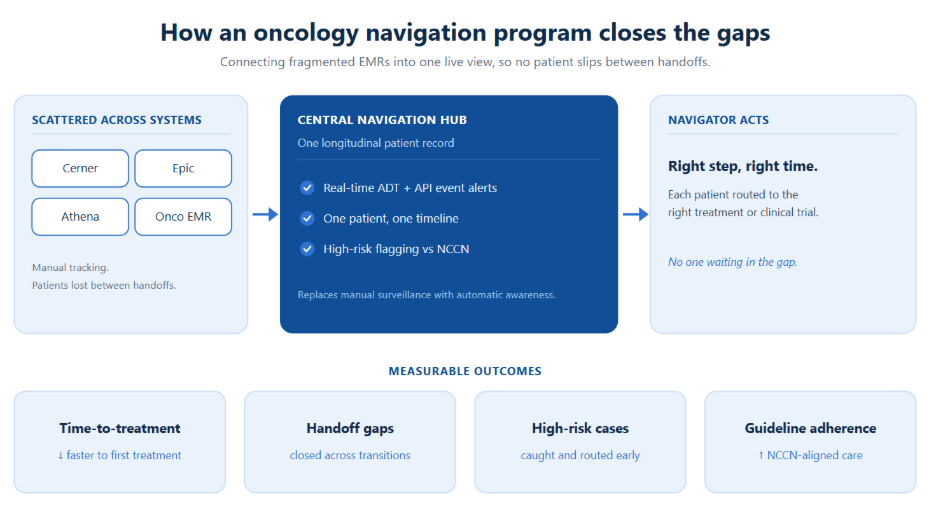
Figure: From scattered EMRs to a single navigation view. The hub turns manual surveillance into automatic awareness.
CMS Reimbursement for Principal Illness Navigation Services
For years, navigation improved outcomes but sat on the books as a cost center.
Since January 2024, Medicare has reimbursed navigation through Principal Illness Navigation (PIN), and cancer is one of the named eligible conditions. After an initiating visit, a treating practitioner can bill for navigation delivered by trained auxiliary personnel, including patient navigators and peer-support specialists, under general supervision. The work is captured by HCPCS codes G0023 and G0024, with peer-support variants G0140 and G0146. For the billing mechanics, the ACCC’s provider breakdown of PIN is a useful reference.
The strategic point holds regardless of the code details: navigation is now fundable. That changes the build-or-expand conversation. A program that documents its activity well can offset a real share of its cost, which turns the infrastructure behind it (clean tracking, defensible documentation, accurate time capture) into a financial question as much as a clinical one.
Comparing Oncology Navigation Software and Integration Options
There’s no single right answer here. There is a right way to frame the choice.
An EMR-native navigation module is the lowest integration lift if your whole program lives inside one EMR. In practice, most oncology programs span more than one system, and native modules rarely see across the boundary. Standalone navigation software gives you purpose-built workflows and reporting, often with a better day-to-day experience for the navigator. The catch is that it becomes one more system to integrate, and if it isn’t fed live data, you’ve just bought another place to type information by hand. A custom interoperability layer, or navigation hub, sits across your existing systems and consolidates them into one view, with ADT and API-driven alerts and high-risk routing. It costs more up front, but it solves the real constraint, cross-system visibility, instead of adding to it.
The deciding question isn’t which tool has the best feature list. It’s where your patient data actually lives, and what it takes to give one navigator one accurate view of it. If that data is scattered across systems, no single-system tool fixes the handoff problem. The integration is the product.
A Phased Rollout Plan for an Oncology Navigation Program
Programs stall when they try to do everything at once. Staging the work lowers the risk.
- Pilot. Start with one cancer type or one site. Set baselines for the four metrics and prove the workflow on a small caseload before you scale it.
- Integrate. Connect the systems that matter most first: ADT feeds for event awareness, then the EMRs that hold the record. Retire manual tracking step by step rather than all at once.
- Scale. Extend to more cancer types and sites, add high-risk flagging and guideline checks, and build the reporting that supports both clinical review and PIN documentation.
Each phase should pay for the next, in outcomes, in reimbursable activity, or in navigator time freed from manual work.
Why Connected Patient Data Is Essential for Scaling Navigation
Most navigation programs don’t stall for lack of navigators. They stall because the patient’s data is scattered across EMRs that don’t talk to each other. Nalashaa builds the interoperability layer that pulls Cerner, Epic, Athena, and oncology EMRs into one navigation view, with ADT-driven alerts and high-risk routing.
Book a 30-minute interoperability assessment
FAQ
What is a patient navigation program?
It’s a coordinated service that assigns a trained navigator to guide patients through a complex care pathway. In oncology, which runs from a suspicious finding through diagnosis, treatment, and follow-up, clearing the logistical and system barriers that cause delays or dropouts.
Does Medicare cover patient navigation?
Yes. Since January 2024, Principal Illness Navigation (PIN) lets Medicare reimburse navigation for patients with serious, high-risk conditions, including cancer, billed by the treating practitioner (codes G0023 and G0024) for work done by trained navigators after an initiating visit.
What’s the difference between a nurse navigator and a case manager?
An oncology nurse navigator guides one disease pathway from start to finish with clinical judgment: patient education, interpreting results, catching red flags early. A case manager focuses more on utilization, authorization, and discharge planning across a broader population, rather than walking one cancer patient through their journey.
How do you measure the success of a patient navigation program?
Four metrics: time-to-treatment initiation, handoff and lost-to-follow-up rate, the share of high-risk cases flagged in time, and NCCN guideline adherence. Programs that can report these can defend their budget. Those who can’t are guessing.
What software do patient navigators use?
Options run from EMR-native navigation modules to standalone platforms to custom interoperability layers that unify multiple EMRs into one view. The right choice depends less on features than on how scattered the patient data is across systems.

Latest posts by Priti Prabha (see all)
- AI in Oncology Medical Billing: Fixing Claims That Stall - October 16, 2026