
It is 8:45 a.m. at a busy specialty practice, and the prior authorization coordinator already has a dozen payer portals open. One request needs clinical notes attached, and two show “pended” with no reason given. Another was approved yesterday, but nobody wrote the approval back into the chart, so the front desk is about to reschedule a patient who is already cleared. The scene is an illustration, but the workload behind it comes straight from the data.
Physicians complete an average of 40 prior authorizations a week, and the work takes about 13 hours of physician and staff time each week, according to the AMA’s 2025 Prior Authorization Physician Survey. Eligibility checks, claim status lookups, and balance clean-up sit on top of that, and most of it still runs through the same portals, one login at a time.
Robotic process automation (RPA) often gets pitched as the answer to all of it, but a bot only does well on certain kinds of work. The more useful question is narrower: which healthcare workflows will a bot run dependably, every day, without someone watching over it? This post names five, starting with prior authorization, and shows what the bot takes over, what a person keeps, and what the results have looked like in real projects.
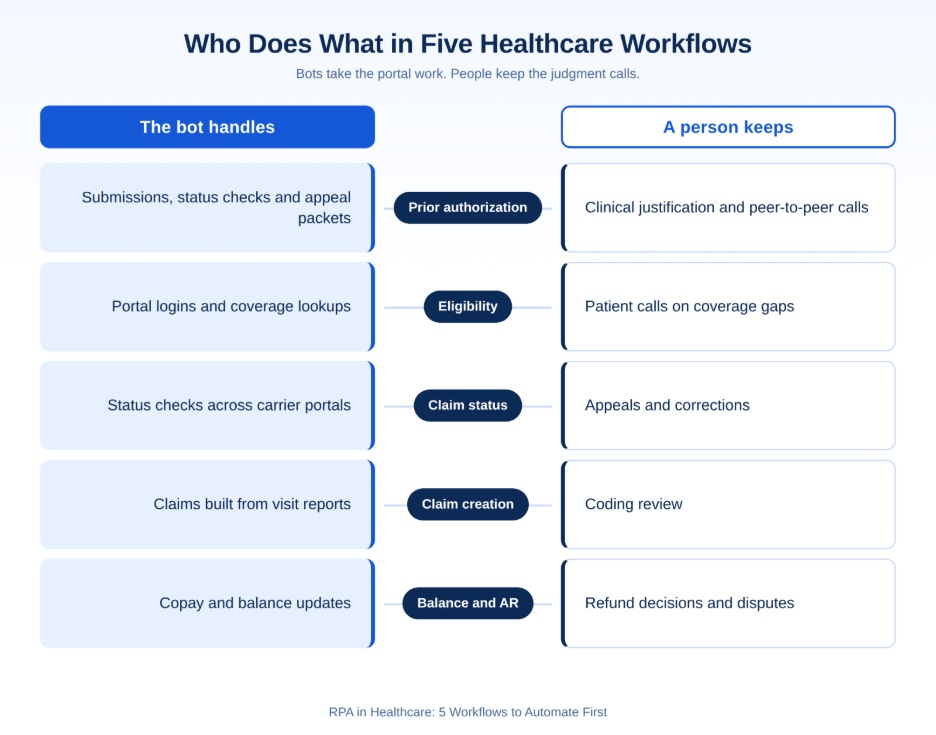
- In short: RPA works best on healthcare work that is rule-based, high volume, runs through a stable portal or screen, and has a cost per transaction you can measure. Five workflows pass those tests: prior authorization, eligibility verification, claim status checks, claim creation, and balance and AR clean-up. In each one, the bot handles the logins, lookups, and data entry, while people keep clinical judgment, appeals and exceptions. Getting that hand-off right matters more than the bot itself.
What Manual Administration Costs Now
Nearly $18B. Spent by US hospitals in 2025 to overturn claim denials.
Source: AHA Costs of Caring 2026
The cost of doing this work by hand is well documented. In the 2024 CAQH Index, a manual eligibility check, prior authorization, or claim status inquiry cost providers about 2.4 to 4.3 times as much as an electronic one, and since those figures count labor only, the real gap is wider. Time adds to the bill: the same report says a phone claim status inquiry takes providers about 25 minutes, and a prior authorization takes 24 minutes by phone, fax, or email against 16 by portal. The 2025 CAQH Index puts the savings still available from fully automating manual and partially manual transactions at $21 billion across US healthcare.
| Provider transaction | Manual | Electronic |
| Eligibility and benefits check | $7.97 and 20 minutes | $2.18 and 4 minutes |
| Prior authorization request | $10.97 and 22 minutes | $5.79 and 11 minutes |
| Claim status inquiry | $11.37 and 24 minutes | $4.29 and 7 minutes |
Denials add another layer of cost on top of that. In Experian Health’s State of Claims 2025 survey, 41% of providers said 10% or more of their claims are denied, up from 30% in 2022, and 54% said claim errors are increasing. Beyond overturning denials, hospitals spent $43 billion in 2025 trying to collect what insurers owe, according to the AHA’s Costs of Caring report.
Regulation is also changing how fast this work has to move. Under CMS-0057-F, Medicare Advantage plans, Medicaid and CHIP programs and their managed care plans, and QHP issuers on the federal exchanges must give a specific reason for every prior authorization denial from January 1, 2026. Most of them must also decide within 72 hours for expedited requests and 7 calendar days for standard ones (the decision clocks do not apply to QHP issuers). A Prior Authorization API follows by January 1, 2027. Faster payer decisions only help a practice that submits clean requests and picks up the answer quickly, which is exactly where a bot earns its place.
What Does RPA Do in Healthcare?
Robotic process automation in healthcare is software that works through the same screens a staff member uses, logging into payer portals, EHRs, and practice management systems to read, copy, and enter data by fixed rules. It does not need the payer or the EHR vendor to build anything new, which is why it fits the portal-heavy work that fills a revenue cycle team’s day.
RPA follows rules, but it does not interpret what it reads. AI reads unstructured documents, predicts denials or drafts an appeal letter, and agentic AI can decide the next step on its own. In practice, the strongest setups use RPA for the repeatable clicks and hand anything that needs reading or judgment to AI or a person. Our post on RPA vs AI vs agentic AI covers that split in detail.
Four Tests for a Workflow Worth Automating
Before any workflow goes to a bot, it should pass four checks. The five in this post pass all of them.
Rule-based.
Every step can be written down as “if this, then that.” If staff regularly make judgment calls mid-task, the bot will stop and wait for them.
High volume.
The task runs dozens or hundreds of times a day. A bot that saves four minutes on a task done twice a week will never repay its build and upkeep.
Stable portal or screen.
The task runs through portals and systems that don’t change layout every month. Every redesign on the payer side means a bot fix on yours.
Measurable cost per transaction.
You know how long the task takes today and what it costs. Without that baseline, you can’t prove the bot worked.
5 Healthcare Workflows to Automate First with RPA
1. Prior Authorization: Submission, Status and Appeals
Prior authorization is the heaviest manual load in most practices. Nearly one in three physicians (32%) say requests are often or always denied, according to the AMA, and 35% of providers name authorizations as a top cause of denials in Experian’s 2025 survey. In the CAQH figures above, an electronic request takes about half the time and cost of a manual one, so every step that comes off manual handling counts. A bot can take on three parts of this work.
Submission. At scheduling, the bot checks whether the payer requires authorization for the ordered service and flags any referral that is missing. It then pulls the order, diagnosis, and insurance details from the EHR, fills the payer’s portal form, and attaches the documents staff has marked for the request.
Status tracking. The bot checks each open request across payer portals on a set schedule, writes approvals, authorization numbers, and valid dates back to the chart, and flags anything pending for more information. No one has to log in to ten portals to find out what changed overnight.
Denials and appeals. When a request is denied, the bot pulls the denial reason, the original request, and the relevant clinical notes into one appeal packet. Since CMS-0057-F now requires impacted payers to state a specific reason for each denial, that packet is more useful than it used to be.
What a person keeps: clinical justification, peer-to-peer calls, and the decision to appeal. For the payer side of the same process, see our posts on prior authorization automation for health plans and what breaks in Prior Authorization API projects.
2. Eligibility and Benefits Verification Before the Visit
In Experian’s 2025 survey, 32% of providers named incomplete or incorrect patient registration data as a top denial trigger, and much of that starts with coverage that nobody checked. The bot pulls the next day’s appointments, checks each patient’s coverage on the right payer portal, and writes copay, deductible, and coverage status into the chart before the patient arrives. Staff then call only the patients whose coverage is inactive or unclear.
A Tennessee urology practice with more than 120 appointments a day across six payer portals cut the time per verification by about 70% after Nalashaa built its eligibility bots. The bots run after hours on the practice’s own servers, so patient data stays in-house.
Watch out for: portal downtime, which is why those bots include retry logic and alerts, so an outage doesn’t quietly leave the morning schedule unverified.
A quick ROI check. Use this formula: appointments per day × minutes saved per check × loaded staff rate. For the urology practice, the 120 daily appointments and the roughly 70% cut in time per verification come from the case study. The other two inputs are assumptions, not Nalashaa results. Assume a manual check took 10 minutes, so a 70% cut saves 7 minutes, and assume a loaded staff rate of $30 an hour (wages plus benefits and overhead). Then 120 appointments × 7 minutes is 840 minutes, or 14 hours a day, worth about $420 a day. Replace the timing and the rate with your own numbers before you use the result in a business case.
3. Claim Status Checks
Experian’s survey found 90% of denials are reworked with at least some human review, and staff often find the denial only after chasing the claim. The bot reads the aged-claims report, finds each carrier’s portal, pulls status and any denial reason, and sends the results to the team that works them. People spend their time on corrections and appeals instead of lookups.
For a US revenue cycle company handling 500 status checks a day, Nalashaa’s bot cut handling time from 5 minutes to 1.5 minutes per transaction.
Watch out for routing, because a bot that finds 40 denials and drops them into one inbox has only moved the backlog. Decide who owns each denial type before go-live.
4. Claim Creation from Visit Data
Missing or inaccurate claim data is the most common denial trigger, named by 50% of providers in Experian’s 2025 survey, and claim creation is where most of that data first enters the billing system. The bot reads visit reports and charts, matches each encounter to the face sheet or schedule, and creates the claim or updates its number in the billing system.
Nalashaa’s hospital rounding claim bot handles 75 to 80 claims a week in 2 minutes each instead of 10, and replaced an external contractor. For an anesthesia group across nine Georgia facilities, a bot that reads surgery center charts with OCR to pull ICD and CPT data reduced manual tasks by 95% and claim rejections by 85%.
What a person keeps: coding review and any encounter the bot can’t match.
5. Balance and AR Clean-Up
Medicare and Medicaid overpayments must be reported and returned within 60 days of being identified under the Affordable Care Act (42 CFR 401.305 for Medicare Parts A and B), so credit balances can’t sit untouched. Much of the work behind them is repetitive: applying copays to new claims, moving balances, updating insurance, and adding account notes. The bot does these from daily reports and leaves refund decisions and disputes to staff.
Nalashaa’s copay bot processes 350 to 400 claims a day in about 10 seconds each instead of a minute. An AR correspondence bot handles about 90 transactions a day in 3 minutes each instead of 15.
Across the four bots with minute-level data, handling time per transaction fell by about 70% to 83%.
Where RPA Stops
Every one of these workflows has a point where the bot should hand off. Planning for those points up front is what keeps a bot running a year after go-live.
Portal and interface changes.
A bot follows screens, so when a payer redesigns its portal, the bot breaks until someone updates it. In one eligibility project covering ten carrier portals, Nalashaa built and tested each portal’s flow separately so a change on one site didn’t take down the rest, and that kind of upkeep belongs in the budget from the start.
Exceptions and unstructured documents.
Faxed records, handwritten notes, and free-text payer letters don’t follow rules. Route them to people, or to an AI layer that can read them, and let the bot pick the work back up once the data is structured.
Clinical judgment and appeals.
A bot can assemble an appeal packet, but it can’t argue medical necessity or hold a peer-to-peer call. That work stays with clinicians and experienced staff.
APIs replacing portals.
As payers covered by CMS-0057-F go live with Prior Authorization APIs by January 2027, portal-based bots for those payers should give way to direct API connections. Commercial plans outside the rule will keep their portals, so plan which payers move first and keep the bot for the ones that don’t.
Bot access to PHI.
A bot logs in with real credentials and touches protected health information. Give each bot its own account with the least access it needs, log every action, and keep it on infrastructure you control.
How to Start: Five Questions to Answer First
- What does one transaction cost today?
Time a sample of real requests, checks, or claims, so you have a baseline to measure against.
- Who owns the exceptions?
Name the person or team that picks up every case the bot flags, before the bot starts flagging.
- How often do the target portals change?
Start with payers whose portals are stable and leave the ones that redesign often for later.
- How will the bot’s credentials and PHI access be controlled?
Decide where the bot runs, which accounts it uses, and how its actions are logged.
- What counts as success?
Pick two or three measures, such as minutes per transaction, backlog size, or denial rate, and agree on them before go-live.
Will RPA Replace Healthcare Staff?
No, RPA takes over the repetitive portal work, not the people who understand the payer rules, the clinical context, and the patient. Two in five physicians already employ staff dedicated only to prior authorization, according to the AMA, and 43% of providers in Experian’s survey say they are understaffed. For most teams, a bot means those people stop spending their day on logins and lookups and spend it on appeals, patient calls, and the exceptions that need them. In the hospital rounding case above, the bot replaced an external contractor, not in-house staff.
Where Nalashaa Fits
Nalashaa Healthcare builds and maintains RPA bots for providers and revenue cycle teams, from eligibility and claim status to claim creation and AR clean-up, and pairs them with AI and FHIR integration where rules alone aren’t enough. The work is platform-agnostic, so if you already run an automation platform, the bots are built on it. Every build includes audit trails, access logs, and documentation aligned to HIPAA and HITRUST.
See the results in our healthcare case studies, or explore our healthcare automation services. If prior authorization or another workflow in this post is eating your team’s week, talk to our experts about where a bot would fit first.
The Bottom Line
RPA pays off in healthcare when it is aimed at the right work: rule-based, high-volume tasks that run through stable portals and have a cost you can measure. Prior authorization, eligibility verification, claim status checks, claim creation, and balance and AR clean-up all fit that description, and each one has a clear line between what the bot does and what a person decides.
Start with one workflow, measure it against a real baseline, and plan for the hand-offs and portal changes from day one. With payer APIs arriving under CMS-0057-F, the teams that know where their bots end and their APIs begin will be the ones ready for 2027.
Frequently Asked Questions
What is RPA in healthcare?
RPA in healthcare is software that logs into payer portals, EHRs, and billing systems and completes repetitive tasks by fixed rules, the same way a staff member would. Common uses include eligibility checks, prior authorization status, claim status and claim creation.
Which healthcare workflows are best suited to RPA?
Workflows that are rule-based, high volume, run through stable portals, and have a measurable cost per transaction. Prior authorization, eligibility verification, claim status checks, claim creation, and balance and AR clean-up fit all four.
Can RPA automate prior authorization?
Yes, RPA can automate the repetitive parts of prior authorization. A bot can check whether authorization is required, submit requests from EHR data, track status across payer portals and assemble appeal packets. Clinical justification, peer-to-peer calls, and appeal decisions stay with people.
Is RPA HIPAA compliant?
RPA can be run in a HIPAA-compliant way, but compliance depends on how it is set up. Give each bot its own credentials with minimum access, log every action, encrypt data, and run bots on infrastructure you control.
What is the difference between RPA and AI in healthcare?
RPA follows fixed rules on structured screens and data. AI reads unstructured content, predicts outcomes, and drafts text. Many healthcare teams use both: RPA for the clicks, AI for the reading and judgment support.
Will RPA replace healthcare staff?
No, RPA takes over portal logins, lookups, and data entry, which frees staff for appeals, patient calls, and exceptions, so most teams use bots to cover staffing gaps rather than cut roles.
What happens to prior authorization bots when payers launch FHIR APIs?
Payers covered by CMS-0057-F must offer a Prior Authorization API by January 1, 2027. For those payers, submission and status should move from portal bots to API connections. Bots stay useful for commercial payers that still rely on portals.
How do you measure the ROI of RPA in healthcare?
Measure minutes and cost per transaction before and after go-live, along with backlog size and denial or rejection rates, and compare them against the baseline you recorded before the build.

Latest posts by Priti Prabha (see all)
- RPA in Healthcare: 5 Workflows to Automate First - October 6, 2026