
ASCO’s principles for the responsible use of AI in oncology say that “patients and clinicians should be aware when AI is used in clinical decision-making and patient care.” A chart can only keep that promise if the record itself shows when AI touched it.
Now picture an ambient scribe that writes “carboplatin AUC 5, cycle 3” into a visit note while the regimen in the same chart says a target AUC of 6. Both lines look equally official, and nothing tells the person reading the chart which one a human wrote.
Reading the chart is the easy part of adding AI to an oncology EHR. The harder part is deciding what the AI may write and who commits it. This post applies three permissions, read, propose, and commit, to the regimen record (the treatment plan, its orders, dose calculations, and checks) described in the post on oncology EHR software.
Short answer: AI EHR integration in oncology comes down to three permissions. A safe design lets the AI read what a clinician would see, write only proposals that are labeled as AI output, and leave every commit to the regimen, the dose, and the verification with a signed-in clinician. The record would also name the AI system and its model version on anything the AI touched, so the chart can show later who did what.
Read, propose, commit: the rule behind a safe oncology integration
An AI service in an oncology chart can hold one of three permissions, and each one asks for a different level of trust.
- Read: the service sees what a clinician with the same task would see, and nothing more.
- Propose: the service writes a labeled suggestion to a separate area that no safety check reads.
- Commit: a signed-in clinician moves a proposal into the record, and the record names that person.
One simple rule keeps this design safe. Anything that a later safety check depends on, such as the plan, the dose, or a verification, can only be committed by a person. Everything else can be proposed freely, because a proposal changes nothing until someone acts on it.
The rule applies to the service account itself, so it holds even when a scribe, a decision support tool, or a new screen sits in front of that account.
What each part of the regimen record would allow
The regimen record from the earlier post holds a plan, orders, dose calculations, verifications, and a log of changes. The table applies the rule to each of those objects. Every row is a safe default, not a requirement from any standard.
| Record object | AI would read | AI would propose | Only a person commits |
| Treatment plan | Diagnosis, drugs, cycle and schedule | A flag when a plan element is missing | Any change to the plan |
| Order | The order and the plan it points to | A flag when the order and the plan disagree | Signing the order |
| Dose calculation | Height, weight, labs, and the calculation method | A recalculation prompt when the weight changes past the organization’s threshold | The calculation and its checks |
| Verification | Which of the four checks are complete | Nothing | All four verifications |
| Change event (toxicity or dose) | Earlier changes and their reasons | A draft entry built from the visit | Documenting the change |
| Oral agent order | The oral order, quantity, refills, and schedule | A refill or adherence prompt | The oral order |
| Visit note | The note and the active regimen | The scribe’s note, labeled as AI output | Signing the note |
The verification row stays empty on purpose. The ASCO-ONS standards place the four verifications for parenteral drugs (before preparation, during preparation, before each administration, and with the patient present) with approved personnel and licensed clinicians, so an AI service has nothing to propose there either. The earlier post on oncology EHR software lists all four checks. The other rows let the AI add value without touching a record that a safety check depends on.
The same read access serves other work. Prior authorization requests draw on the same plan and orders, as the post on AI prior authorization in oncology explains.
How an AI proposal enters the chart
A proposal needs a path into the chart that a person controls at the last step. The diagram below shows the full path from record to commit.
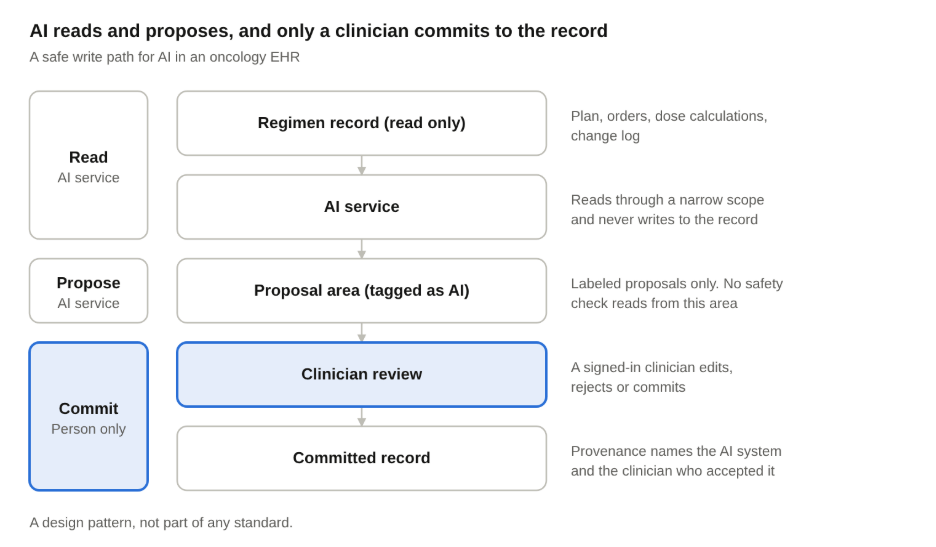
Read the diagram from top to bottom: the AI service never writes past the proposal area on its own.
Illustration: a patient’s weight drops past the organization’s threshold between cycle 2 and cycle 3. The AI service reads the new weight and the dose calculation record, then writes a recalculation prompt to the proposal area, tagged as AI. The prescriber reviews the prompt and reorders if the change warrants it, and the pharmacist verifies the new calculation with the same method and variables. Committing the new dose sends it through the dose checks and, for an infusion, the four verifications. The Provenance record shows that the prompt came from the AI system and who accepted it, so on cycle 3 the nurse sees the reason without searching notes.
Three steps in that path map to FHIR mechanisms:
- A narrow read scope. The AI service connects through SMART on FHIR, whose scopes name a resource type and the permissions allowed on it, such as read and search or create and update. Read and write are separate, because write access does not imply read access.
- A labeled proposal. The service writes its output to a proposal area, and each item carries the AI tag from the HL7 AI Transparency on FHIR guide, which marks a resource with the AIAST security label, a code that means artificial intelligence asserted.
- A provenance record. The HL7 guide describes a Provenance record that points to the AI system, recorded as a Device resource, and to its model card, a document that describes the model. The same record should also name the clinician who accepted the proposal.
Scopes limit the resource type and the kind of interaction, not the status of what is written. Keeping a write to proposals only therefore also takes server-side policy, or a separate resource type or endpoint for proposals. FHIR offers a draft status and a proposal intent on some resources, but the standards define no commit step, so a commit would be a new write or a status change that the Provenance record points to. Every consumer, such as patient access, bulk export, health information exchange, and reports, must also exclude proposals.
The HL7 guide is still at ballot, a review stage before a standard is published, so treat it as a direction and not a settled standard. It also notes that a tag alone “does not indicate if a clinician was involved in the use of the AI, or reviewed the output of the AI,” which is why the provenance record matters.
Not every suggestion needs to be written into the record. CDS Hooks lets a service return cards that the clinician sees inside the workflow, such as an information card or a suggestion card. For a simple prompt, a card in the workflow may be enough, and where the EHR has no place for proposals, a worklist or an inbox message tagged as AI output can play the same role. The service should still log each card it shows, because a card that is never recorded leaves no audit entry. Where the AI service needs to exchange data with the EHR, our healthcare interoperability work covers the FHIR connections behind this path.
Ambient scribes: what a note may change
Back to the scribe note from the introduction, which says carboplatin AUC 5 while the regimen says a target AUC of 6. The right behavior is that the note arrives as a labeled draft and flags “dose differs from the active regimen.” Both records stay as they were until a clinician decides which one is right.
A scribe can safely do three things in an oncology chart:
- It can label every line it writes as AI output, so a nurse can tell it apart from a person’s entry.
- It can raise a flag when something it heard disagrees with the plan, the order, or the last change event.
- It can offer a draft change event, such as a reported toxicity, for the clinician to document.
It cannot rewrite a plan element, an order, or a dose, because a safety check reads each of those. For consent, audio retention, who authors the note, and billing code drift, see our post on ambient AI scribes in US clinics, which this post does not repeat.
Decision support: when a suggestion becomes regulated software
A decision support feature is one place where an AI suggestion can cross into regulated territory. The FDA’s January 2026 guidance on clinical decision support software lists four criteria for software that falls outside the device definition. Two of them matter most to a build team:
- Criterion 3, support, not replacement. The software supports or provides recommendations to a health care professional about preventing, diagnosing, or treating a disease or condition.
- Criterion 4, an independent review. The software lets the professional independently review the basis for each recommendation, so the professional does not rely primarily on it.
The guidance defines automation bias as “the propensity of humans to over-rely on a suggestion from an automated system,” and it places that concern under the fourth criterion. It also states that the FDA “does not consider software functions intended for a critical, time-sensitive task or decision to meet Criterion 4,” because a health care professional is unlikely to have enough time to review the basis independently.
The design consequence is that each suggestion carries the chart data it used and the guideline version behind it, on the same card. A card that shows only a recommendation asks the clinician to trust it. A card that shows its basis lets the clinician check it.
Whether a feature such as a dose recalculation prompt counts as time-sensitive is a question for regulatory counsel, and this section is not legal advice.
What the audit trail has to answer
Weeks after a dose change, a pharmacist or an auditor may ask what shaped it. An oncology record should answer five questions without anyone digging through system logs:
- What the AI proposed, in the exact words or values it produced.
- Which inputs from the record the AI used to produce it.
- Which AI system and model version produced the proposal.
- Who reviewed the proposal and what that person decided.
- What changed in the record after that decision.
The HL7 guide offers four levels of detail for this work: tagging AI-influenced data, documenting the model, recording the data sources, and capturing the human and AI process. It calls tagging very lightweight, and it says the fullest level is very verbose and “may not be justified beyond initial model use.” Answering all five questions takes more than the tag, because it also needs the model and data source levels. Logging suggestions and edits is the baseline. The five questions go further by tying each proposal to a model version and to what changed afterward, and a regular review of rejected or edited proposals shows where the AI is wrong.
There is also a clinical reason to keep this record. ASCO’s principles say AI tools “should be transparent throughout their life cycle.” A record that answers these five questions is how a product keeps that promise to the people who rely on it.
Six checks before an AI feature goes live
Use this list before an AI feature reaches clinicians, and treat any item you cannot answer as a blocker.
- Permissions on paper: write down read, propose, and commit for every record object before the build starts.
- The AI tag: every proposal would carry it, and a test should fail when one does not.
- A separate proposal area: confirm that no safety check, report, or claim reads from it.
- A weight change mid-cycle: change a test patient’s weight and confirm that the recalculation is only proposed and never committed.
- A quiet period: run the service before clinicians see anything, and compare its proposals with what they actually did.
- A review of overrides: look at the proposals that clinicians rejected or edited, and ask why.
Whoever reads the chart should never have to wonder who wrote a line in it. An AI service that reads only what it needs, proposes in the open, and leaves every commit to a person keeps the chart trustworthy, and the record shows exactly what the service did. Build to that standard before the first AI feature reaches a clinician, because a permission is far easier to grant later than to take back.
How Nalashaa helps
Nalashaa’s healthcare AI and interoperability teams help software teams and provider organizations add AI to the EHR without loosening these controls. Our team can help with three things:
- The permission map: which record objects an AI service would read, which it would only propose to, and which stay with a person, for your product or workflow.
- The integration path: how the AI service would connect through FHIR and SMART, and where its labeled proposals would live until a clinician acts.
- The governance layer: audit trails, explainability, and human review, set against the FDA’s guidance on decision support.
If you are adding AI to an oncology or specialty EHR, see our healthcare AI consulting services or connect with us at info@nalashaa.com.
FAQ
What is AI EHR integration in oncology?
EHR integrations are the connections that let other software read from and write to the health record, usually through standards such as FHIR. In oncology, AI EHR integration also has to respect the regimen record, so a connected AI service can read the plan and dose history but cannot change anything that a safety check depends on.
What should an AI service never change in an oncology record?
An AI service should never change the treatment plan, an order, a dose calculation, or a verification, because each of those feeds a safety check. It would write labeled proposals to a separate area, and a signed-in clinician would commit them to the record.
How do you show that a note or suggestion came from AI?
The HL7 AI Transparency on FHIR guide, which is still at ballot, describes how. Tag each AI-influenced resource, for example with the AIAST label, and add a Provenance record that names the AI system and the person who accepted the output, so anyone reading the chart can trace the line back to its source.

Latest posts by Priti Prabha (see all)
- AI EHR Integration for Oncology: What AI can Read and Write - October 23, 2026